
The assignment's payer is expired
Recommended Action: Update this assignments payer to a non-expired payer, then resubmit
- Renew the payer or Add a payer
- Make sure it is linked to the assignment Payer
- Verify the payer was not ADDED vs. RENEWED causing an expired payer
Address is not defined OR Zip Code is Required when EVV Clock In/Out Time is confirmed via EVV
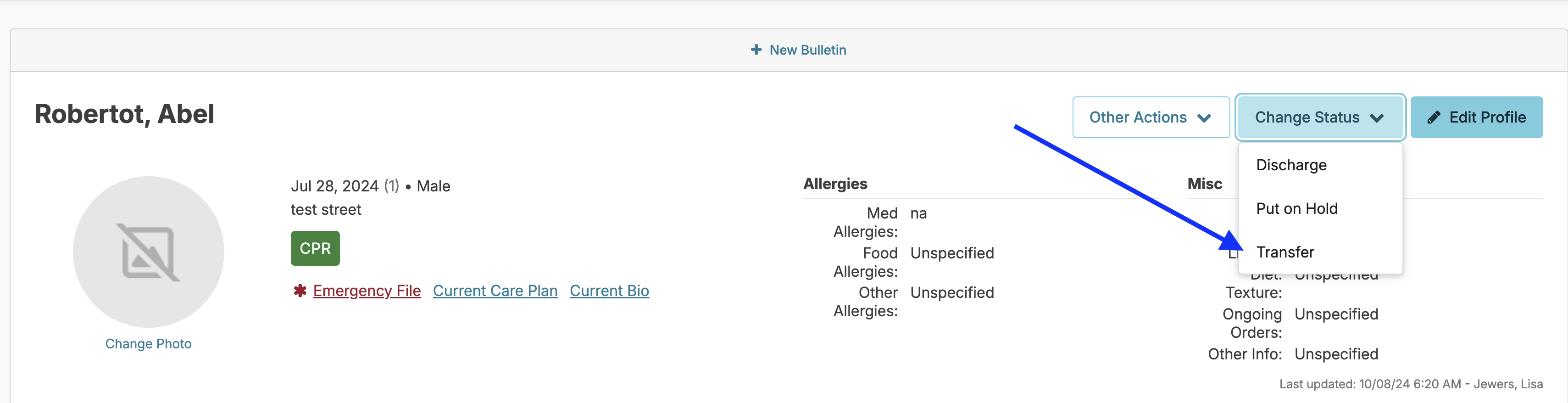
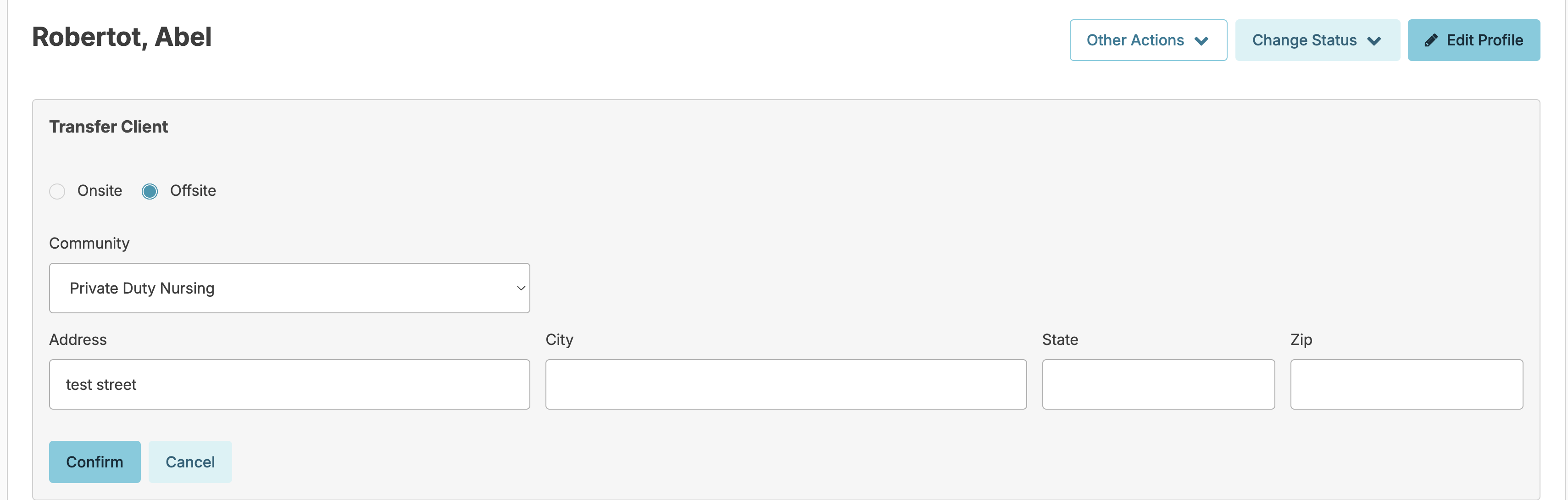
Recommended Action: Transfer to an off-site address where the Address, City, State, and Zip code fields are complete and resubmit the record.
- From the Resident Profile > Click Change Status > Transfer
- Correct the address and press confirm
This record was created before EVV was enabled and was therefore not submitted
Resubmit the record for verification.
To resolve this error, resubmit the record for verification using the steps below.
- If EVV was just turned on: Open the record and select the "Reevaluate Record" option to resubmit.
- If the issue persists: Verify the client has a payer set up. The payer must not be set to "Waiver unknown" and must have all required information entered. Once updated, make sure the assignment is linked to this payer. Return to the error record and select "Reevaluate Record" to resubmit.
Provider is not found based on Provider Tax ID
Recommended Action: Include the Campus Tax ID in Billing Configuration and Resubmit.
No services were performed
Recommended Action: Have staff chart on services and resubmit.
- Have the staff enter an unscheduled service for the date/time or chart scheduled services for that day/time period
📘 Note: If charting restrictions prevent staff from charting, a nurse or supervisor must chart the service(s)
Visit cannot be greater than 25 hours
Recommended Action: Please adjust the visit timeframe and resubmit.
- Edit the client clock in or clock out time to be accurate and under 25 hours
Member is not found based on Qualifier value
Recommended Action: Member was not found. Ensure you have a valid Insurance # entered and Resubmit.
- Verify the Recipient ID / Insurance number is accurate
- Click to resubmit the record
NOTE: If the EVV record has this error but needs to be deleted, you may follow the steps below to delete the record. Please follow each step completely so you do not impact future EVV submissions.
Step 1: Update the Assignment
- Under Admin, click Assignments
- Click on the assignment for the resident
- Uncheck "Submit records for this assignment to EVV"
- Press Save
Step 2: Resubmit the Individual Clock Records
- Under Admin, click Individual Clock Records
- Click on a record for the resident
- Check the box to not submit the record to EVV
- Check the box to acknowledge the above
- Press Save
Step 3: Verify the Record Has Moved to the "Non-EVV" Assignment Section
- On the Individual Client Clock screen, navigate to the date range of the record
- Verify there is a count in the "Show Non-EVV Assignments" section
- If the record does not appear here, check whether it returned with a different error message
- Refer to the applicable section of this help document to resolve that error, or use the trash icon to delete the record if needed and available
Step 4: (Optional) Delete the EVV Record
- Check the box to show Non-EVV Assignments — this will display all records
- Optionally, click the trash icon next to the assignment
⚠ IMPORTANT — DO NOT SKIP STEP 5
- Navigate back to Admin > Assignments
- Click on the assignment for the resident
- Check the box to submit records for the assignment to EVV
- Press Save
Service Code is not found
Recommended Action: Confirm that the Service Code submitted is correct and Resubmit.
Visit duration is 0
- Edit the client clock in or clock out time to be accurate and greater than 0
Invalid NPI or UMPI Number
📘 Note: You must email Residex to notify us that you updated the NPI/UMPI number after EVV submission was activated.
No Prior Authorization Number Entered for Resident
Invalid Payer Address
Another Visit is using the same time in full or in part
Recommended Action: Overlapped Shift times are not allowed. Correct the times so they are not sharing the same time.