
Table of Contents:
About Thea
Thea is Residex's AI assistant, built into the EHR to support clinical documentation. Thea provides suggestions as you work - during assessments, audits, and incident reports - to help you capture complete, accurate information.
Thea's suggestions are meant to support your documentation, not replace your clinical judgment. You are responsible for the accuracy of everything you submit. Review each suggestion and accept, modify, or ignore it based on your direct knowledge of the situation.
Thea AI can make mistakes. Always verify accuracy before saving.
What Thea is designed to do
- Help you make more informed decisions at the point of care
- Reduce time spent on documentation so you can focus on resident care
- Surface potential risks before they become critical issues
- Streamline your workflow with automated documentation support
- Allergies
- Diagnoses
- Medications
- Service Plans
- Clinical notes from the last 30 days
- Previous and current assessment documentation
Residex Assessments, Powered by Thea
Thea reads a Resident's current chart and surfaces relevant suggestions as you work. It scans:
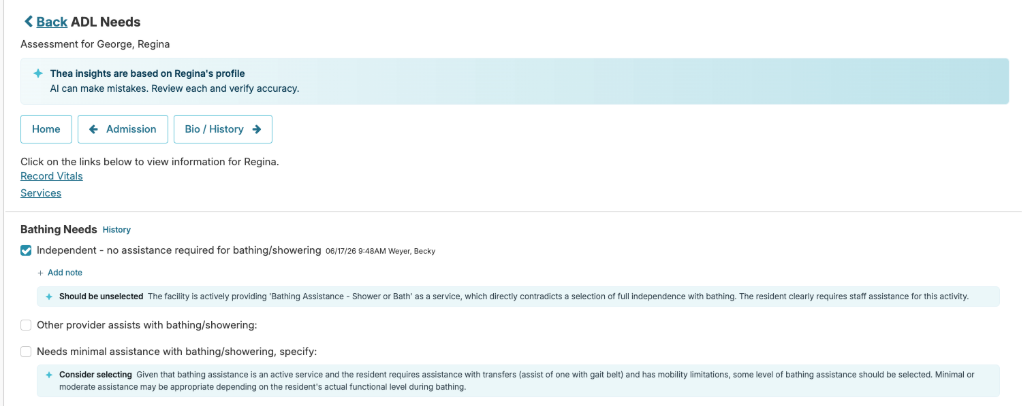
Thea flags assessment options that may need attention and highlights contradictions between your responses and existing chart data. For example, if you select full independence for bathing, but the resident has an active bathing assistance service as part of the service plan.
Thea AI-powered suggestions are available across all assessment types, including Clinical Update, Fall Risk Assessment, Self-Administration of Medications, and others.
Why it matters
Caregiving is high-stakes work where details matter and mistakes happen. A missed allergy, contradicting assessment documentation, or an incomplete clinical note can impact resident outcomes and create compliance risk. Thea cross-references the resident's current chart so you can catch those gaps before you save.
How to use it
Suggestions appear as you complete each assessment evaluation option, marked with a Thea icon. You can incorporate, modify, or ignore any suggestion.
Example of Thea while completing an assessment:
Example 2: 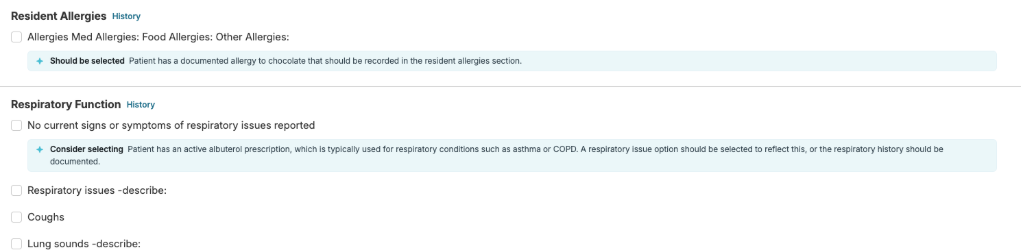
After you complete an assessment
Thea automatically generates a clinical note summarizing the assessment findings and highlighting any changes from previous assessments. Key features of the generated note:
- Change tracking: Emphasizes newly added, updated, or removed selections since the last assessment
- Complete documentation: Provides a comprehensive summary of the resident's current functional status
- Compliance-ready language: Uses professional clinical language appropriate for regulatory review
- Survey Preparation Audits (Medication Management, Employee Files, etc.): Suggestions focus on meeting the highest compliance standards, as these audits receive maximum regulatory scrutiny.
- Emergency Preparedness (Fire Drills, Evacuation Plans, etc.): Suggestions emphasize clarity, completeness, and actionable details to demonstrate genuine emergency readiness and staff competency.
- Health and Safety Measurements (pH Testing, Food Safety, etc.): Suggestions focus on specificity -- exact measurements, timestamps, and corrective actions -- to document proper safety protocol adherence.
- Safety and Risk Audits (Fall Risk, Drug Diversion, etc.): Thea helps eliminate vague responses by prompting for specific details about hazards identified, actions taken, and follow-up verification.
- Operational Audits: For all other audit types, suggestions focus on professional documentation standards and regulatory compliance best practices.
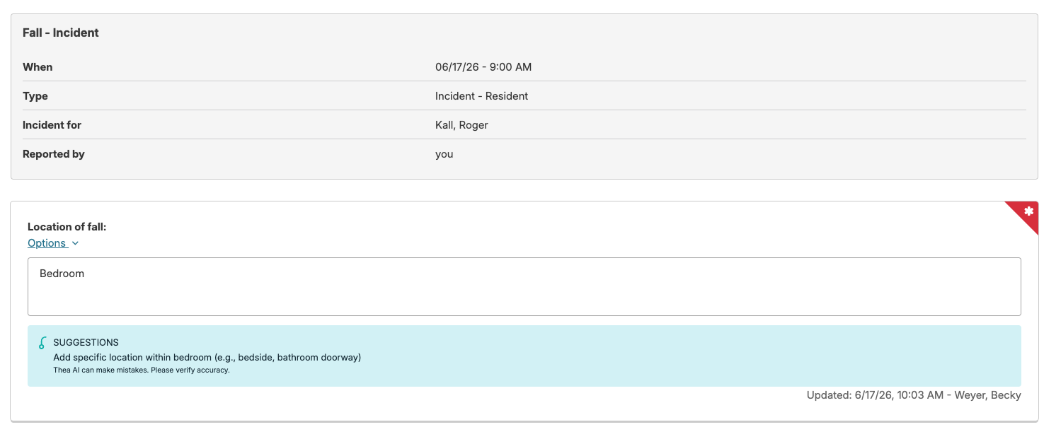
- Initial Reporting Stage: Suggestions help frontline staff (Resident Caregivers, Housekeeping, Dietary) document what they observed or were told, within their scope of practice. The focus is on capturing essential details -- location, timing, circumstances, and immediate actions taken.
- Clinical Review Stage: Suggestions assist licensed nursing staff and supervisors in performing comprehensive clinical assessments, identifying patterns, and documenting corrective actions. The focus is on clinical evaluation, care modifications, and systemic issue identification.
Example of Thea AI-generated clinical note: 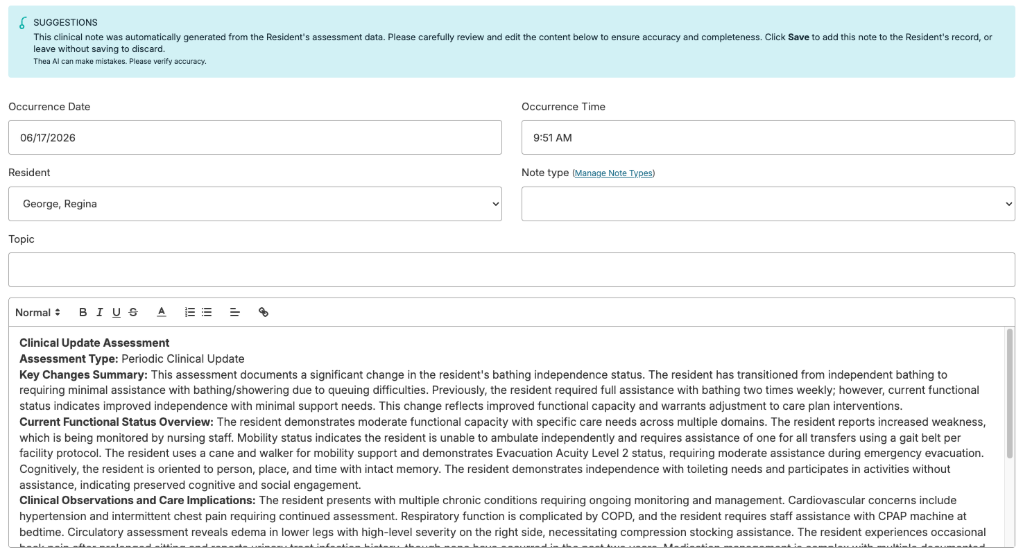
Residex Audits, Powered by Thea What it does
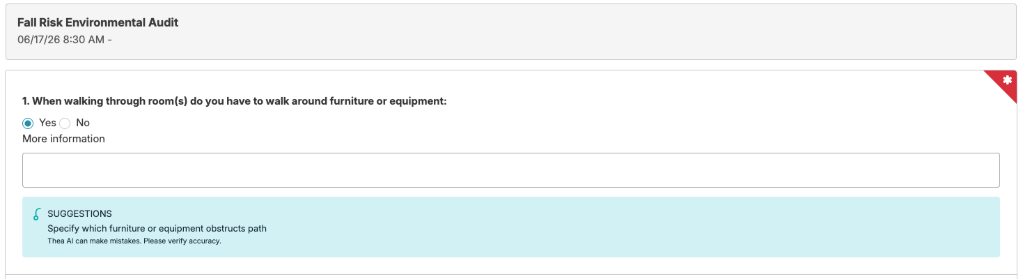
Thea provides real-time suggestions as you complete audit forms. It analyzes your responses as you enter them and offers guidance to strengthen documentation quality and compliance.
Suggestions are tailored to the type of audit you're completing:
Why it matters
Thorough audit documentation protects your facility during state surveys and regulatory inspections. Thea's suggestions are designed to help you capture the specific details -- exact measurements, locations, actions taken -- that surveyors look for. You stay in control of every response.
How to use it
Suggestions appear as you complete each audit question, marked with a Thea icon and a Suggestions label. You can incorporate, modify, or ignore any suggestion. The form saves automatically, so you can work at your own pace.
Residex Incidents, Powered by Thea What it does
Thea provides real-time suggestions as staff complete incident reports, at both the initial reporting stage and the clinical review stage. Thea analyzes responses as they're entered and offers guidance to strengthen documentation quality and accuracy.
Suggestions are tailored to your role:
Why it matters
Incomplete incident reports are one of the most common sources of survey citations. Thea helps you capture the right details at the right time so nothing gets missed in the moment.
How to use it
Suggestions appear as you complete each incident question, marked with a Thea icon and supportive messaging. You can incorporate, modify, or ignore any suggestion. The form saves automatically, so staff can work incrementally without losing progress.
Questions or Issues
If you have questions about Thea or encounter unexpected behavior, contact your facility administrator or reach out to Residex Customer Support at support@residex.ai.