
Survey Preparedness (SP)
Residex offers tools that can be used to prepare for a Minnesota Department of Health Assisted Living Survey for your facility.
Survey preparedness planning is an important administrative task for health care settings. Residex has created a set of tools that will help prepare you for your Minnesota Department of Health Assisted Living Survey according to the guidelines set forth in the: MN Department of Health Assisted Living Forms and Self-Audit Tools. The tools will guide you through the process of preparing for your 144G Assisted Living Survey. There is a report called Survey Prep-Survey Support in Residex that outlines all of the requirements for the survey and how Residex can help you maintain compliance. Residex also provides Survey Prep (SP) audits that help you determine areas you are compliant and areas you may need some further work to prepare for survey. In addition, we have created Survey Prep-Missing Assessment Data reports that will help you determine areas in your assessments that may need additional information to be in compliance with the assessment regulations.
Step 1: Run the report Survey Prep - Survey Support in Residex
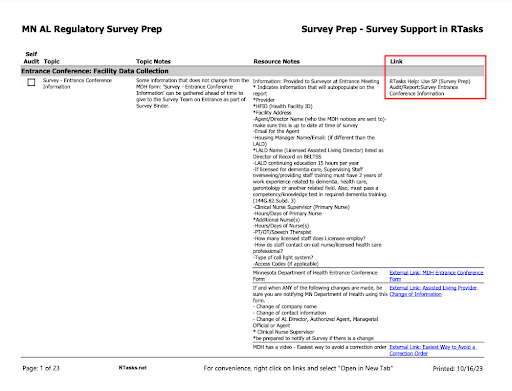
Residex recommends you start by running the report Survey Prep - Survey Support in Residex. This report provides a comprehensive list of all of the items you will need to prepare for your survey including links to relevant websites, documents, rules and regulations, and tips on how you can fully utilize Residex to help prepare for your survey. This report is set up as a checklist that you can use to keep track of the areas you have audited to prepare for your survey. The report can be found by navigating to: Fax/Print > Reports > Category: Survey Prep AL - MN > Report: Survey Prep- Survey Support in Residex
Step 2: How to read the report Survey Prep- Survey Support in Residex
In the report: Survey Prep- Survey Support in Residex under the link column, it will indicate when a particular area has a SP (Survey Prep) audit that can help you prepare for your survey. The audits were based off of the audit tools on the MDH website. The Resources Notes column has additional information about what the MN Department of Health will be looking for and expecting during the survey. There are also links to relevant websites that can help you familiarize yourself with the regulations. This report also includes support articles from Residex that give you the information you need to use Residex to comply with many of the regulations.
Step 3: Survey Prep Reports
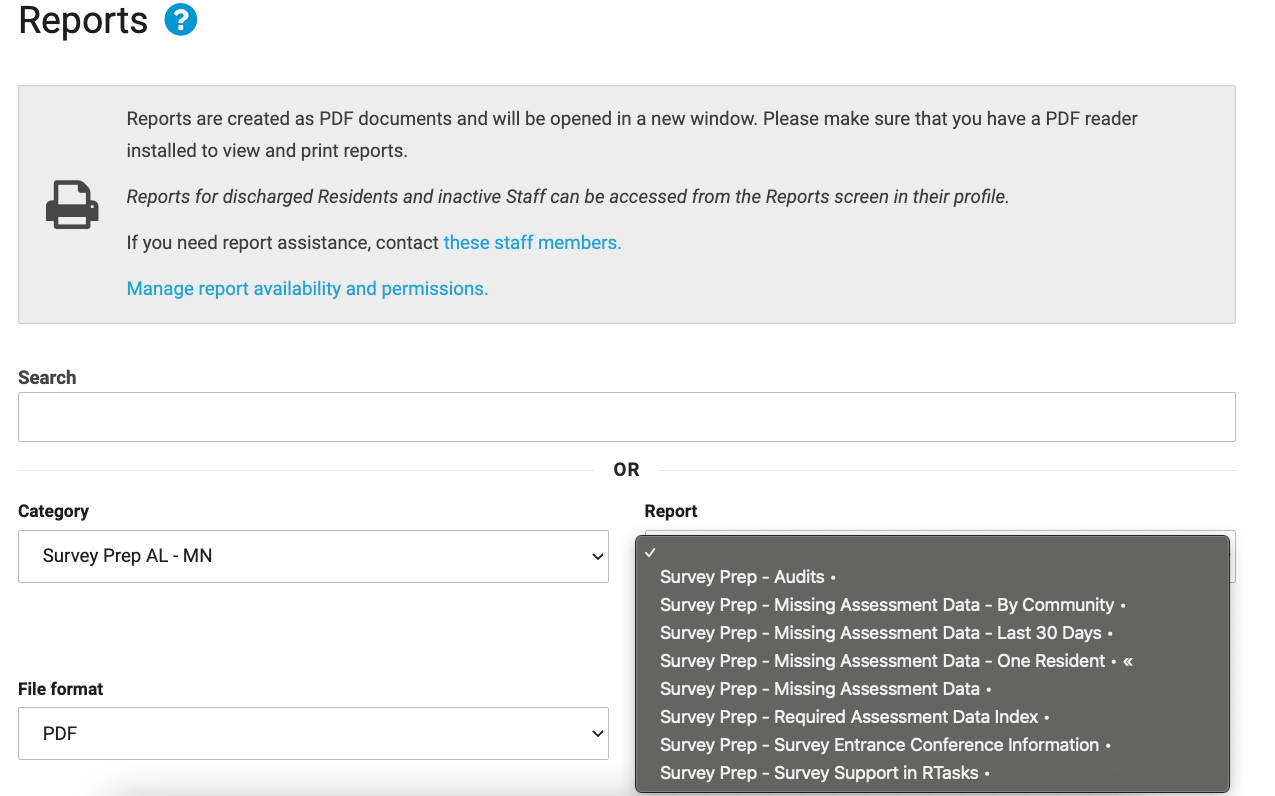
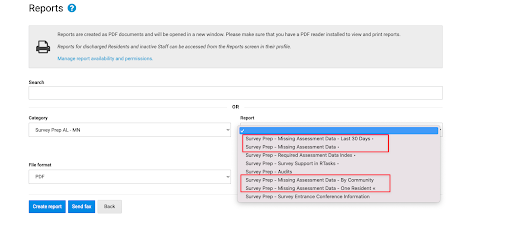
Navigate to: Fax/Print > Reports > Under Category: Survey Prep AL- MN you should have 8 reports you can run. If you do not see all 8 reports, you may need to go to the blue link by the printer icon called: Manage Report Availability and Permissions and activate the report(s) for your provider type.
Step 4: Managing Survey Prep Audits
Navigate to: Today > +More > Incident/Audit Types and you can manage who can view and enter the Survey Prep audits by choosing the edit pencil. Here is a support article describing that process.
Manage who can View/Edit Audits
Step 5: Completing Survey Prep Audits
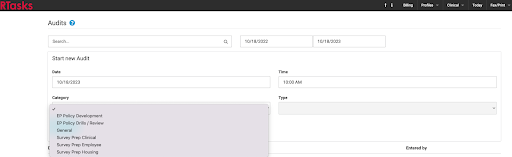
Navigate to: Today > +More > Audits > Category: Survey Prep
Step 6: The First Survey Prep Audit to Complete
First, Residex recommends you complete the audit: SP- Survey Entrance Conference Information. Once you answer the questions in the audit you can run the report: Survey Prep- Survey Entrance Conference Information. This report will serve as the first page of your survey binder which will include the initial information surveyors will request during the entrance conference.
Note: In order for the Licensed Assisted Living Director (LALD) to auto populate on the report, you will need to have a staff person in your campus with the title of LALD. If there is not a LALD listed in your campus because their profile is in another campus, you can add their name and email to question 2 in the audit.
Residex recommends you have a Survey Binder that has documents you know will be requested during your survey that don’t change on a regular basis. Items such as your annual TB risk assessment, documentation of your bi-annual Staffing Plan review (see tip below), your CLIA waiver, and an admission packet are examples of requested documents you can have available in the event the surveyors come to the facility when the LALD or Clinical Nurse Supervisor are not readily available. You can also upload these documents to Today > +More > Campus Documents in Residex which creates an electronic copy of your survey binder.
Step 7: Staffing Plan Review
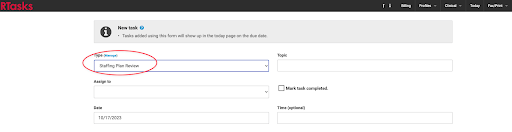
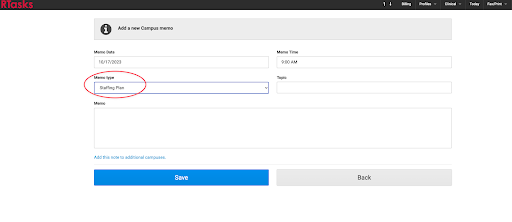
A staffing plan evaluation is required at minimum every 6 months per the 144G Assisted Living regulations. Residex has created a Task Type called: Staffing Plan Review that can be assigned to the person responsible for reviewing the staffing plan and the task will recur every 182 days and will show up on the person’s Today screen. You can activate the report Tasks - Next 1 Week and place it in your login report as a reminder of when the staffing plan review is due. We have also created a Campus Memo type called Staffing Plan that can be utilized to post the staffing plan.
Step 8: Complete Survey Prep Audits
The series of **survey prep audits are found under Today > + More > Campus > Audits > Category: Survey Prep.
This includes the audits:
- SP-Medication Management Services
- SP-Treatment and Therapy Management Services
- SP- Assisted Living Contract
- SP- Current/Recent Emergency Relocation Review
- SP- Discharged Resident Record Review
- SP- Marketing/Admission Packet
- SP- Meal and Menu Requirements
- SP- Resident Daily Life Review
- SP- Resident Record Review
- SP-Survey Entrance Conference Information (complete 1st)
- SP- Employee File- Annual Training Audit
- SP- Employee File- Unlicensed Personnel (ULP) Skills Training audit
- SP- Employee File Audit
Once each audit is complete, you can run the corresponding report summarizing your answers to the audit questions by using the report called: Survey Prep - Audits (located in the Survey Prep AL - MN Report category). Answering the questions with a “surveyor lens” will give you a working document of what areas you are prepared for and those areas you may need further preparation.
Step 9: Survey Preparedness Follow Up
An audit is only helpful if you follow up on the findings. For example, if you do an audit of your employee files and discover that several employees are missing some required orientation and/or annual training, you will want to make sure the employees follow up on the training.
Perhaps you discover that several employees are missing direct in person supervision of delegated services such as: medication administration, oxygen management, or checking blood sugar levels within 30 days of their 1st shift caring for residents. You will want to ensure that you not only indicate these findings, but follow up on making sure the supervisions are completed. Staff Supervisions can be tracked in Residex. You may not be able to meet the 30 day window, but at least the supervision has been done when the surveyor arrives.
Tip: If there are areas within the audit that need follow up, do not mark the audit as complete. Save the changes, and you can go back into an open audit and make comments about what was done to comply.
Further, you always want to identify the process and/or procedure for ongoing compliance. What is the root cause of why you were not in compliance? Perhaps a procedure or process map needs to be developed, or staff training on Assisted Living regulations is necessary to have the tools in place to meet the regulatory requirements on an ongoing basis.
Step 10: What Assessment Categories are Required
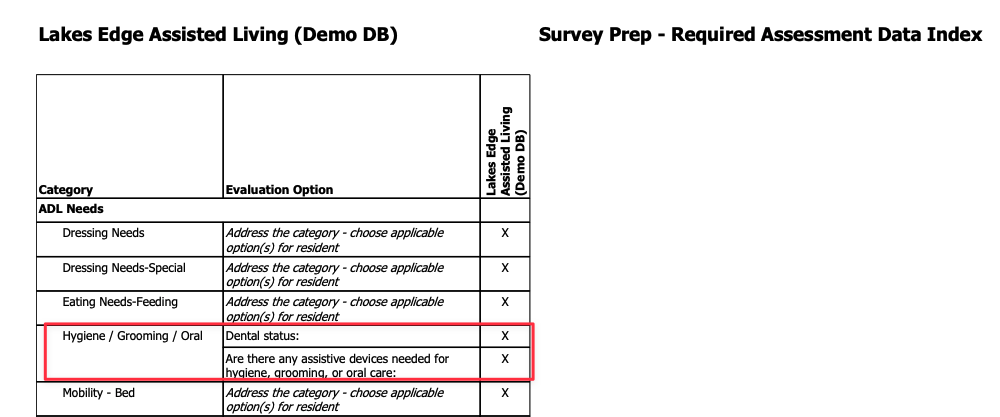
Run the report Survey Prep- Required Assessment Data Index. Each category on this report has to be addressed in full. If there is a specific evaluation option listed on the report it is indicating this area is required to be completed and addressed for all residents. In the picture below, the Category Dressing Needs is required, but has verbiage on the report that says: Address category: choose applicable option(s) for resident which means this category needs to be addressed but there is not an additional evaluation option.
The Category Hygiene / Grooming / Oral is an example of a Category that has a specific evaluation option which will need to be addressed when you do the assessment. If you don't it will show up as missing on the Survey Prep- Missing Assessment Data Reports.
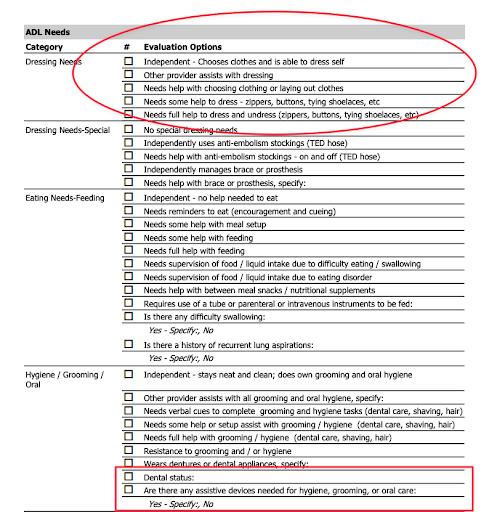
This is how the category's look on the assessment.
Step 11: Identifying Missing Assessment Data
Under the category: Survey Prep- AL MN there are 4 reports on Survey Prep - Missing Assessment Data that can help you identify which areas you may need to provide further information on the assessment. A thorough, well-done, person-centered assessment is the building block for many of the areas the surveyors will be reviewing and most importantly improves the quality of care. The reports will indicate: Address category: choose applicable option(s) for resident if you still need to address a required assessment category.
The Report Category: Tag: State of MN- Survey will be VERY helpful during your survey and will contain much of the information you will need to provide to the Surveyors. Surveyors may request limited access to Residex to conduct the survey. Instruction on setting up a surveyor in Residex is available here: Survey Management and Remote Access
Finally, Residex has developed tools to help you create your Emergency Disaster Plan, which will also be a focus during your survey. You can find the support article outlining how to use these tools at: Emergency Preparedness Planning
Residex is committed to your success as an Assisted Living provider and we hope the Survey Preparedness tools help you feel confident when your survey occurs! Please call Residex support if you have any questions during your survey!