
Coverage is a feature that can be turned on/off in scheduling. This will allow your internal staff to put their shift up for grabs internally to see if a teammate is able to cover for them. Turn on this feature in the location settings, click here for more information.
Please note: shift coverage is auto approved and not allowed less than 24hrs prior to shift start.
How to manage coverage:
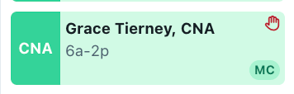
- The red hand symbol will show when someone has raised their hand to request coverage.
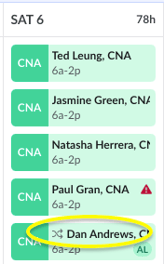
- The swap symbol shows when someone has picked up a shift coverage request (reminder this will be auto approved).
- For more details click the "History" tab on a shift.