
Invoice vs. Statement
After the posting process is complete, you are ready to print invoices/statements. The difference between an invoice and a statement:
- An invoice will display the current month's charges only
- A statement will display the current month's charges as well as a "new account balance"
- A statement will display payments and adjustments made within the current period but an invoice will not
- Statements are only available if you license the Residex Accounts Receivable (A/R) module
Invoice Reports
Invoice - All - Used to print all residents' invoices.
- This report does not have blank pages between to allow for duplex printing
- Select the report and select "All Residents" at the top of the list
Invoice - Used to print One, Some or All
- If your facility uses duplex printing, this report will have a blank page between each invoice to allow for front to back printing
Statement Reports
Statements - All - Used to print all residents' statements
- This report does not have blank pages between to allow for duplex printing
- Select the report and select "All Residents" at the top of the list
Statement - One Resident Only - Used to print one resident's statement at a time
- This report allows to print one, some or all
- This report works when duplex printing is used
Statement - Update - Used to reprint a statement showing any adjustments applied
- This report will show adjustments that were not on the initial statement
- It is helpful to resend a copy of the initial statement with a new adjusted balance
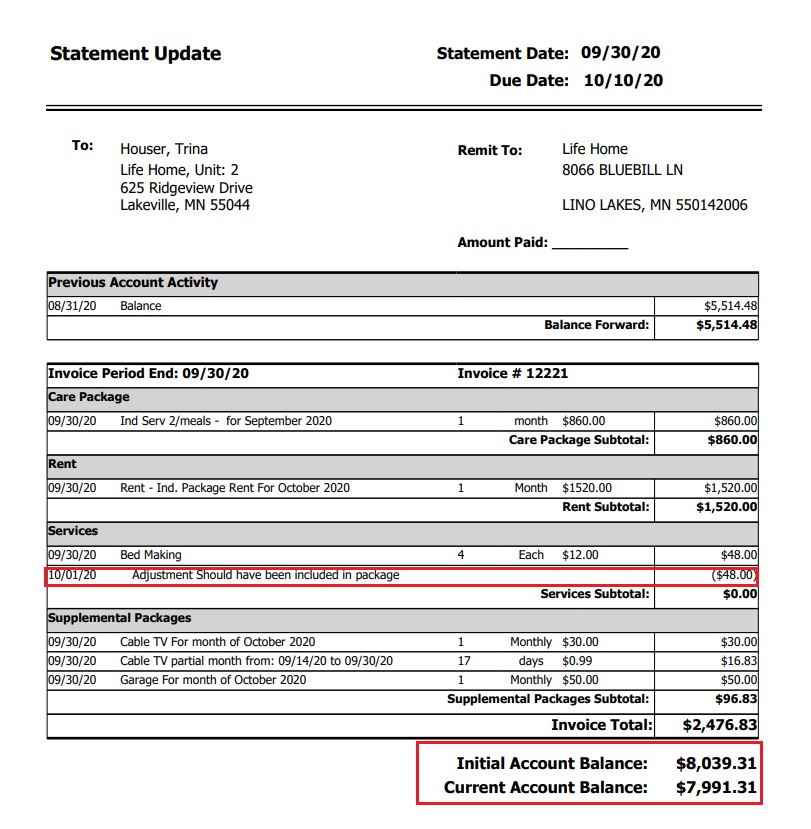
Sample - Statement Update
Statement Consolidated
When using Residex billing, you may wish to use the "consolidated statement" option. Consolidated statements will allow you to combine two residents' total charges onto one statement.
Keep in mind, while the report "Statement Consolidated" bundles two residents' charges into one statement, payments will be applied to the individual resident account.
Consolidated Statement Setup:
- Go to Residents > Residents > Click on a resident profile (This would be the "Primary" person for a shared invoice)
- Click Billing & Finance
- In the Household Shared With option list, select the resident who will be on the consolidated/combined statement
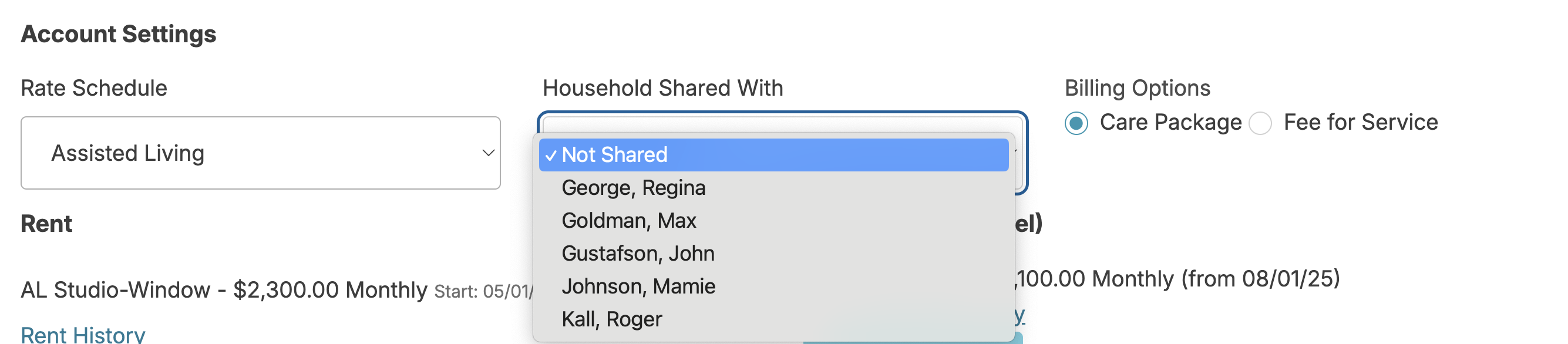
Statement Consolidated Report
- Process and post billing as usual
- Go to Reports > Reports > search for 'Consolidated'
- Select the report Statement - Consolidated (May have a custom name for your database)
- Select the Invoice Date (The most recent is sorted to the top)
- Select All Residents or one name from the option list
- Click: Create Report
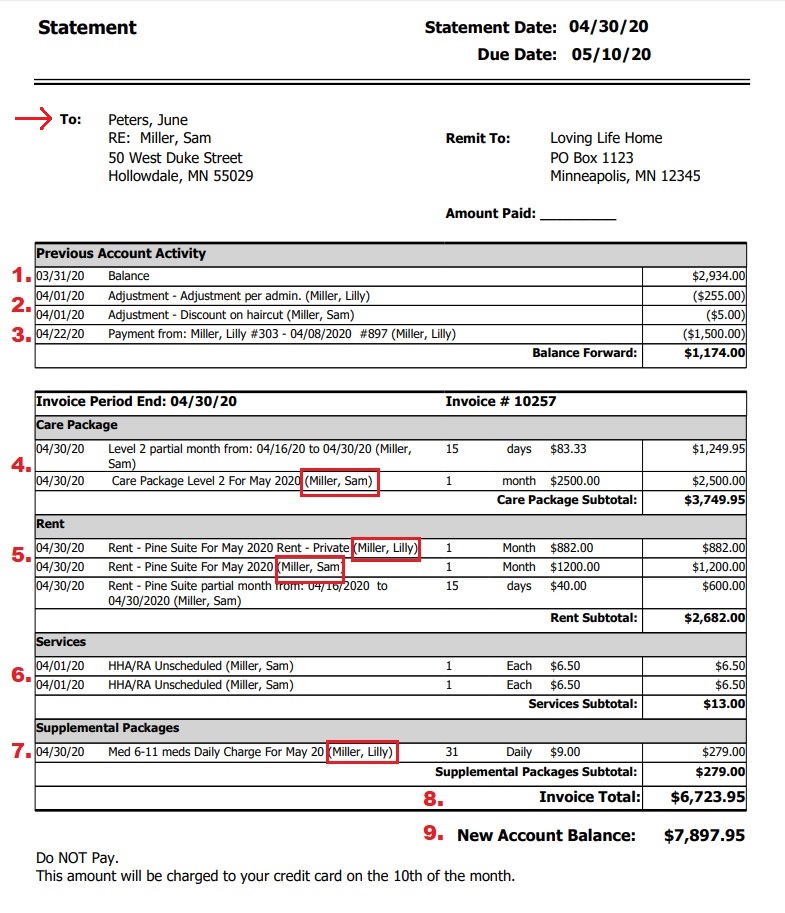
Sample Report
→ The statement will be addressed to the "Primary" resident (not the one select under "Household Shared with) OR the Billing contact for this resident
- The total (combined) previous balance will be displayed
- Adjustments for any of the individuals will be displayed (If applicable)
- Payments for either of the individuals will be displayed (if applicable)
- Care packages will be displayed per individual
- Rent for each individual will be displayed
- Service charges or any other charges per individual will be displayed
- Supplemental package for each individual will be displayed
- The combined "Invoice Total" will be displayed
- The combined "New Account Balance" will be displayed
Report- Fees and Payer Changes- Date Range Summary
In the report 'Fees and Payer Changes- Date Range Summary', the discharge date will populate from one of three places:
- If the resident is private pay, and does not have an end date entered in Fees/Payers>Rent, the discharge date will be the discharge date from Care Status History
- If the resident is private pay, and a rent end date is entered in Fees/Payers>Rent the report will show the discharge date as the Rent End Date for the most current rent
- If the resident is not private pay, and has the Program Rent-Private entered in the payer screen, the discharge date will be the end date of the program in the payers screen.
Note: Rent End Date is a configuration setting that your facility may or may not use.